
An exhaust fan that never turns off is more than annoying. It can drive up energy use, wear out the motor early, and make you wonder if you have a wiring problem hiding in the wall.
The good news is that most always-on bathroom fans come down to a handful of predictable causes: a timer or humidity control set wrong, a switch or control wired incorrectly, a continuous-ventilation setting you did not realize was enabled, or a fan housing with a built-in control board or relay that has failed.
I will walk you through quick, beginner-friendly tests first, then the deeper fixes. If at any point you are unsure around electrical work, stop and call a licensed electrician. Bathrooms are a high-risk area because moisture and electricity do not mix.
Safety first (and what is urgent)
Before you touch anything
- Turn off the correct breaker for the bathroom fan or bathroom circuit.
- Verify power is off at the fan and at the switch with a non-contact voltage tester.
- Use a stable step stool and keep hands dry.
When it is urgent
- You smell hot plastic or see discoloration at the switch or fan grille.
- The fan is making a new buzzing or grinding sound.
- The fan will not turn off with the switch off, and the switch feels warm or you can only stop the fan by turning the breaker off.
If any of the above is happening, shut the breaker off and get help. A stuck relay, failing motor, or miswire can overheat components.
Quick diagnosis: what controls your fan?
Always-on behavior makes a lot more sense once you identify what is controlling the fan.
- Standard switch: simple on and off toggle or rocker.
- Timer switch: knob-style countdown, push-button timer, or digital timer.
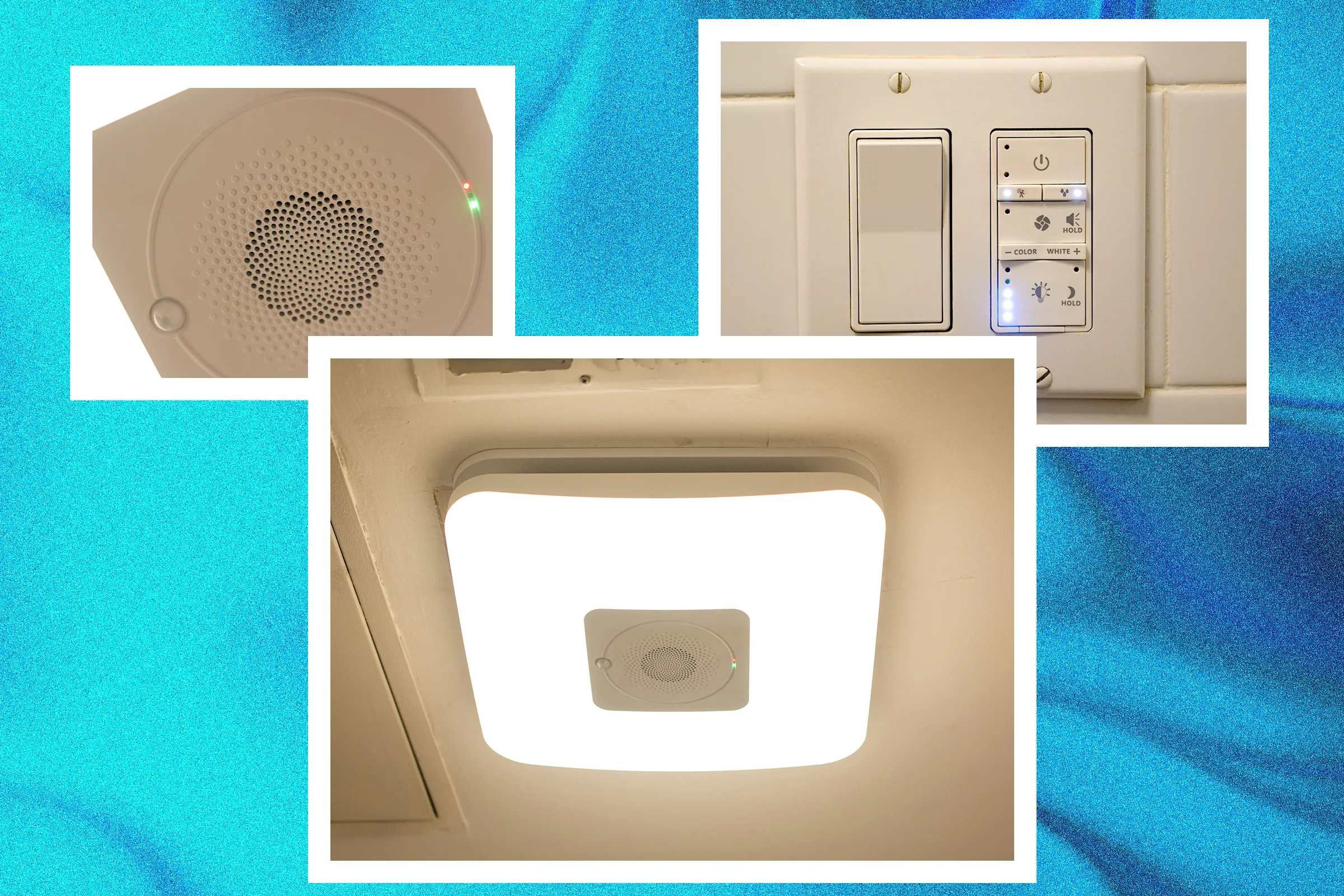
- Humidity control: either a special wall switch, or a sensor built into the fan housing.
- Motion or smart control: occupancy sensing, Wi-Fi, or routines that run the fan automatically.
- Continuous ventilation: some models are designed to run 24/7, often at low speed, to meet ventilation goals.
- Combo units: fan-light or fan-heater units can have more than one switch feeding the same housing.
Tip: grab the model number
Pop the grille and look for a label on the fan housing. A quick phone photo of the model number makes it much easier to find the manual and confirm whether your unit has humidity sensing, a run-on delay, or a continuous mode.
Fast tests (10 minutes)
Test 1: Wait it out
Many fans are designed to run after you leave the bathroom. A timer might be set to 20, 30, or 60 minutes. Humidity models often have a run-on delay so they keep clearing moisture.
- Turn the fan “off” at the switch.
- Set a phone timer for 20 minutes.
- If it shuts off on its own, you likely have a timer function or humidity delay doing its job.
Test 2: Dry the room on purpose
If the bathroom is steamy or the fan is near a shower, a humidity sensor can stay triggered longer than you expect.
- Open the bathroom door.
- Open a window if you have one, or run the HVAC supply.
- Aim a box fan into the room for 5 to 10 minutes.
If the exhaust fan finally turns off after you dry the room out, you are probably chasing a humidity sensor setting, a sensor location issue, or a sensor that is reading “high” when it should not.
Test 3: Confirm you have the right breaker
This is a useful sanity check, but it does not prove a switch bypass by itself.
- With the fan running, turn the suspected breaker off.
- If the fan stops immediately: good. You have the correct circuit, so proceed to control and switch checks.
- If the fan does not stop: you likely turned off the wrong breaker, the fan is on another circuit, or there is a wiring issue. Do not guess. If you cannot confidently identify the circuit, call a pro.
Cause #1: Timer switch set wrong or failing
Timer switches are one of the most common reasons homeowners think their fan is “stuck on.” Some models are easy to bump into a long setting without realizing it.
What to look for
- Knob timer stuck between settings.
- Push-button timer where a button is partially stuck.
- Digital timer programmed for an automatic schedule.
Simple fixes
- Reset the timer: turn it to the lowest setting, then off.
- Power cycle: turn the breaker off for 60 seconds, then back on.
- Check for an “auto” or schedule mode on digital models.
When to replace
If the timer is older, feels loose, or does not reliably click off, replace it. Timer switches are usually inexpensive, and troubleshooting a flaky one can chew up more time than it is worth.
Cause #2: Humidity sensor set too sensitive (or dirty)
Humidity-sensing fans and switches are great in theory, but the default settings can be aggressive. If your bathroom stays even mildly humid, the fan can run for hours.
Where the sensor might be
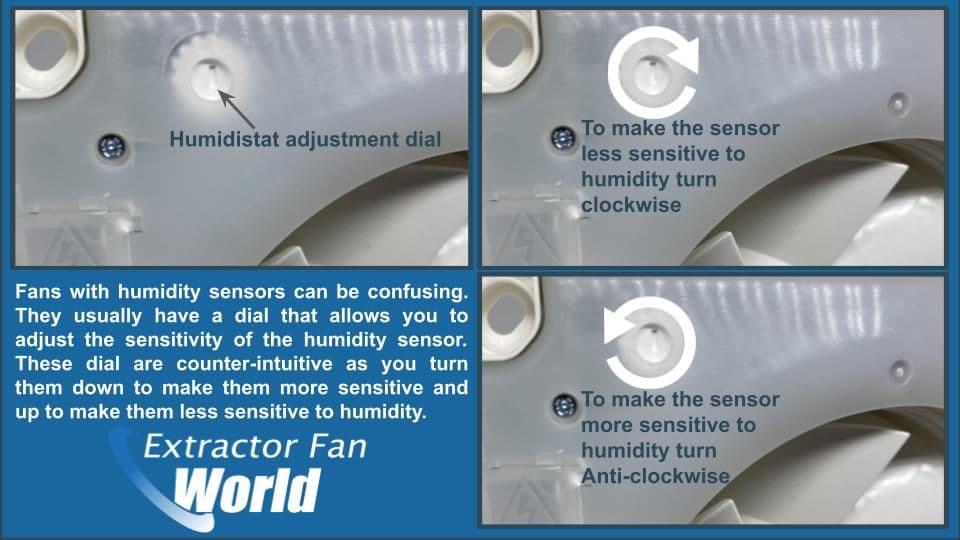
- In the wall control: a humidistat switch with a small adjustment dial.
- Inside the fan housing: some fans have a sensor module under the grille.
What to adjust
- Humidity setpoint: raise it slightly so it does not trigger at normal room humidity.
- Delay time: reduce run-on time if the fan keeps running long after showers.
Clean the sensor (often overlooked)
Dust buildup can cause some sensors to misread and act like the room is always humid. With power off, remove the grille and gently clean dust from the sensor area and intake using a soft brush or vacuum. Do not soak electronics or spray cleaner into the housing.
Quick test to confirm it is the humidity control
If your model has a humidity dial, do this with the power off:
- Note the current setting with a phone photo.
- Turn the dial slightly toward less sensitive or a higher humidity threshold.
- Restore power and see if the fan eventually shuts off in a dry room.
If changing the setting and cleaning makes no difference over a couple of dry hours, the sensor or control board may be failing.
Cause #3: Motion or smart controls keeping it on
Some fan switches include motion sensing, night-light modes, or smart routines. I have seen “always on” complaints that were really just a motion sensor seeing a towel moving from the HVAC vent.
What to check
- Does the switch have a small lens or sensor window?
- Is there a smartphone app tied to the switch?
- Is there a “manual on” mode that does not time out?
Fix
- Disable motion or occupancy mode if possible.
- Reduce the time-out setting.
- Power cycle the switch and re-check settings.
Cause #4: Continuous ventilation mode
Some newer fans are designed to run continuously, often at a low speed, and ramp up when you flip the switch or when humidity rises. If yours is truly meant to run 24/7, what feels like “stuck on” is actually normal operation.
Clues
- The fan is always on, but very quiet at “off” and louder when “on.”
- The fan has a control module, multiple speed wires, or an Energy Star style label mentioning continuous ventilation.
- The manual references continuous, low-speed, or ASHRAE style ventilation.
What to do
- Check the manual for how to disable or adjust continuous mode (sometimes it is a dip switch or a small setting under the grille).
- If it is code-driven for your home or remodel, you may not want to disable it. Consider lowering the continuous speed instead.
Cause #5: Miswired switch or wrong connection
If the fan runs constantly and you are using a standard on and off switch, wiring is high on the suspect list. This is especially common after a DIY switch swap, a remodel, or when someone replaced a fan and tied into the wrong cable.
Common wiring mistakes
- Fan tied to constant hot in the switch box instead of the switched leg.
- Wrong cable in a multi-gang box where light, fan, and vanity share space.
- Two-switch and combo unit confusion: in fan-light or fan-heater setups, another switch can be feeding the fan or a control module.
- Line and load reversed on certain electronic timers and smart switches that require correct orientation. This does not matter on a basic mechanical toggle.
Homeowner-level check (keep it simple)
If you suspect wiring, the safest “DIY” move is often to stop before you start moving conductors around.
- With the breaker off, remove the switch plate and look for loose connections, scorch marks, or cracked devices.
- If you recently replaced the switch and the fan has been stuck on ever since, reinstall the old switch to see if the problem follows the new control.
Non-contact voltage testers can be helpful for a quick check, but they can also mislead you due to induced voltage and how loads are connected. If wiring is suspected and you want a definitive diagnosis, a multimeter and correct test procedure are needed. If you are not comfortable with that, call an electrician.
Cause #6: Stuck relay or failed control board
This is the “fan has a mind of its own” scenario. Many newer fans include electronics for humidity sensing, speed control, or delayed shutoff. Those features often rely on a small relay. When a relay fails, it can stick closed and keep powering the motor even when it should be off.
Clues
- The fan behavior is inconsistent, like it sometimes shuts off and sometimes does not.
- You hear a faint click from the fan housing but the motor stays on.
- Adjusting settings does nothing even when the room is dry.
Clean before you condemn it
Before you assume the board is bad, clean dust out of the housing and off any sensor openings with power off. A heavy dust blanket can cause weird behavior in humidity modules and reduce airflow, which keeps moisture in the room longer.
Simple isolation test
If you can access the fan’s plug inside the housing (many models plug into a receptacle in the can):
- Turn off the breaker.
- Remove the grille.
- Unplug the fan motor plug.
- Turn the breaker on and verify the fan stays off.
This does not prove the relay is bad, but it helps you isolate the fan assembly from the rest of the circuit.
Repair vs replace
- Replace a module if your brand sells an easy swap sensor or control pack and the fan is otherwise quiet and in good shape.
- Replace the whole fan if parts are discontinued, the motor is noisy, or the housing is old. Chasing an intermittent control board failure rarely feels like money well spent.
Cause #7: Built-in dial under the grille
Some fans include a small thermostat or humidistat dial under the grille. If that dial is set too low (thermostat) or too sensitive (humidistat), the fan may run whenever the room is mildly warm or slightly humid.
What to do
- Turn off power.
- Remove the grille.
- Look for a small dial labeled humidity, RH, delay, or similar.
- Make small adjustments and test over time.
Take a photo of the original setting before you touch anything. It is the easiest way to undo a change if it makes things worse.
Cause #8: Backdraft damper confusion
A backdraft damper that is stuck open will not usually make the fan run nonstop. But it can make it feel like the fan is running because you hear airflow, get cold drafts, or smell outside air.
Quick check
- With the fan off, hold a tissue up to the grille.
- If the tissue is pulled toward the grille consistently, you may have a draft issue, not a control issue.
If you suspect a damper problem, inspect the damper at the fan housing or the exterior vent hood for lint, paint, or a stuck flap.
Troubleshooting order
- Confirm it is not a timer or run-on delay. Wait 20 minutes in a dry room.
- Check for continuous mode and combo switches. Look for a second switch, a module, or a low-speed setting.
- Identify the control type. Standard switch, timer, humidity, motion, smart.
- Power cycle at the breaker. Some smart controls and sensors reset cleanly.
- Adjust humidity sensitivity and delay, then clean dust. Small changes, then observe.
- If it started after a switch change, suspect wiring or an incompatible control.
- If settings do nothing, suspect relay or control board failure.
When to call a pro
I am all for DIY, but there are moments where calling in a pro is the cheapest decision you will make all week.
- You have aluminum wiring, knob-and-tube, or anything that looks non-standard.
- The switch box has multiple cables and you are not comfortable identifying line vs load.
- Breaker trips, lights flicker, or there is heat at the switch.
- The fan is part of a multi-function control with heaters or lights and you are unsure of the wiring.
- You cannot find the correct breaker that actually shuts the fan off.
Replacement tips
If you conclude the fan electronics are the problem, replacement is often straightforward and gives you quieter performance.
What to match
- Fan size and housing: some brands offer retrofit kits that fit the existing housing.
- CFM rating: rule of thumb is about 1 CFM per square foot, with many bathrooms using a minimum around 50 CFM. When in doubt, follow the fan manufacturer guidance and local code requirements.
- Sone rating: lower is quieter. If you hate the noise, aim low.
- Control compatibility: if you want humidity sensing, decide whether you want it in the fan or at the wall switch, not both competing.
FAQ
Is it dangerous if my bathroom fan will not turn off?
It can be. Often it is just a timer, continuous mode, or humidity setting, but a miswire or stuck relay can overheat components. If you notice heat, odor, buzzing, or breaker issues, shut it down at the breaker and get help.
Why does my fan run for an hour after a shower?
Humidity models and timer switches commonly run 20 to 60 minutes on purpose. If it is consistently excessive, raise the humidity threshold, reduce the delay time, and clean dust from the grille and sensor area.
Can a bad switch cause the fan to stay on?
Yes. Timer switches, smart switches, and even standard switches can fail internally and keep sending power to the fan.
What is the most common cause?
In my experience: a timer you did not realize was set, a humidity sensor set too sensitive (or dusty), or a control board starting to fail on a newer fan.

About Marcus Vance
Content Creator @ Grit & Home
Marcus Vance is a lifelong DIY enthusiast and self-taught home renovator who has spent the last decade transforming a dilapidated 1970s ranch into his family's dream home. He specializes in budget-friendly carpentry, room-by-room renovations, and demystifying power tools for beginners. Through his writing, Marcus shares practical tutorials and hard-learned lessons to help homeowners tackle their own projects with confidence.